Things you should be looking to buy:

How to buy them fresh:

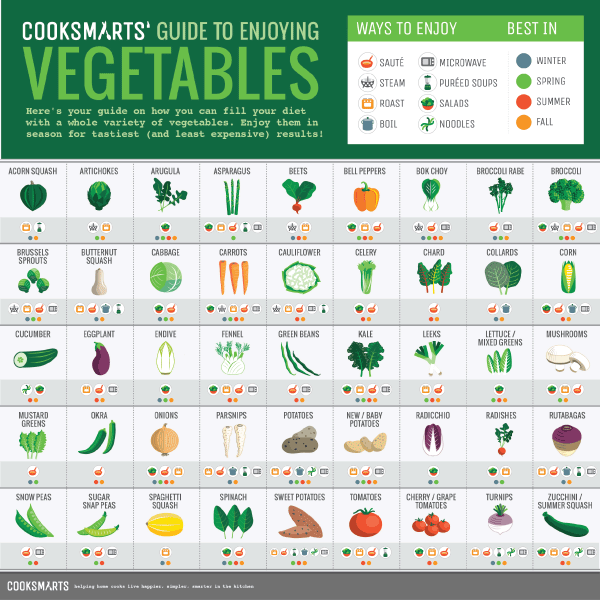
How you can enjoy them:
How long you can store the left overs/ingredients:

The best place to store them:
.jpg)
The best ways to preserve them:
.jpg)
SELECT c.AttributeId, c.Name, a.[Description]
FROM Cars c
JOIN Attributes a ON a.AttributeId = c.AttributeId
WHERE c.AttributeId IS NOT NULL
AttributeId   |  Name   | Description
-----------------------------
1             | Ford    | Cool Car
1             | Chevy   | Cool Car
2             | Honda   | Yellow Car
2             | Mazda   | Yellow Car
SELECT *
FROM Attributes
WHERE AttributeId NOT IN (
 SELECT AttributeId
 FROM Cars
)
SELECT 'Not being used.'
FROM 1 (NotEqual) 2 AND
1 (NotEqual) NULL| p | q | p OR q | p AND q | p = q |
|---|---|---|---|---|
| true | true | true | true | true |
| true | false | true | false | false |
| true | unknown | true | unknown | unknown |
| false | true | true | false | false |
| false | false | false | false | true |
| false | unknown | unknown | false | unknown |
| unknown | true | true | unknown | unknown |
| unknown | false | unknown | false | unknown |
| known | unknown | unknown | unknown | unknown |
    if (myObject.ResourceValue != null)
    {
        otherData.Value = myObject.ResourceValue.ToString();
}namespace ScratchConsole
{
public class Haha
{
private Guid _value;
public Guid Null { get { return _value; } }
}
public class Program
{
static void Main(string[] args)
{
Guid? test = null;
//Guid data = test.Value; // throws an exception.
//Guid data2 = null; // won't compile
Guid data3;
//Console.WriteLine(data3.ToString()); // won't compile, unassigned variable.
Haha ha = new Haha();
Console.WriteLine(ha.Null.ToString()); // outputs "00000000-0000-0000-0000-000000000000"
}
}
} if (myObject.ResourceValue != Guid.Empty)
{
otherData.Value = myObject.ResourceValue.ToString();
}The KeyedCollection uses a Dictionary internally. It is another nice way of managing keyed data.
http://msdn.microsoft.com/en-us/library/ms132438.aspx
http://stackoverflow.com/questions/7...eyedcollection
ol {
    padding-left: 40px;
    padding-top: 10px;
}/// <summary>
/// Writes the serialized form of the object, in xml format, to the file
/// location specified.
/// </summary>
/// <typeparam name="T">type to serialize from</typeparam>
/// <param name="toSerialize">data to serialize</param>
/// <param name="fileLocation">to serialize the data too</param>
public static void Serialize<T>(T toSerialize, string fileLocation)
{
if (toSerialize == null)
throw new ArgumentException("The data to serialize cannot be null.");
if (string.IsNullOrEmpty(fileLocation))
throw new ArgumentException("You must provide a file location to output the data to.");
using (var textWriter = new StreamWriter(fileLocation))
{
XmlSerializer serializer = new XmlSerializer(typeof(T));
XmlSerializerNamespaces ns = new XmlSerializerNamespaces();
ns.Add("", ""); //turn off namespaces
serializer.Serialize(textWriter, toSerialize, ns);
}
}
/// <summary>
/// Reads the data from the file location specified and creates an instance
/// of the object type. The object must be serializable.
/// </summary>
/// <typeparam name="T">type to deserialize the data too</typeparam>
/// <param name="fileLocation">data to deserialize from</param>
/// <returns>new object of type T with properties filled out</returns>
public static T Deserialize<T>(string fileLocation)
{
if (string.IsNullOrEmpty(fileLocation))
throw new ArgumentException("You must provide a file location to read the data from.");
using (var reader = XmlReader.Create(fileLocation))
{
XmlSerializer serializer = new XmlSerializer(typeof(T));
return (T)serializer.Deserialize(reader);
}
}public static void Main(string[] args)
{
MyObject obj = Program.Deserialize<MyObject>(@"Files\SerializedData.xml");
obj.AdjustValues();
Console.WriteLine("Done!!!: {0} test: {1}", obj.Property1, obj.Property2);
obj.AuditDirectoryName = "Test";
Program.Serialize(obj, @"Files\SerializedData.xml");
Console.ReadLine();
}private Listing GetListing(List<Listing> cars, string name)
{
Listing listing = null;
IEnumerable<Listing> results = cars.Where(i => i.Name == name);
//if map doesn't exist create it
if (results.Count() == 0)
{
listing = new Listing()
{
Name = name,
AdditionalData = new List<Data>()
};
cars.Add(listing);
}
else
{
//If we originally did this, it would throw an
//exception when there are no matches found.
//That's why this part is in the else block.
listing = results.First();
}
return listing;
} Once your done specify the location of the javadoc tool. For me the path is "C:/Program Files/Java/jdk1.6.0_20/bin/javadoc.exe " As shown below.

